Introduce
Amazon Relational Database Service (Amazon RDS)
ℹ️ Information: Amazon Relational Database Service (Amazon RDS) is a managed service that allows you to deploy and manage relational databases on AWS. Amazon RDS is designed for online transaction processing (OLTP) and is best suited for storing structured and relational data.
Amazon RDS offers key benefits:
- Easy replacement for traditional database instances
- Automatic backups and patching during customer-defined maintenance hours
- Scalability, replication, and availability with a single click
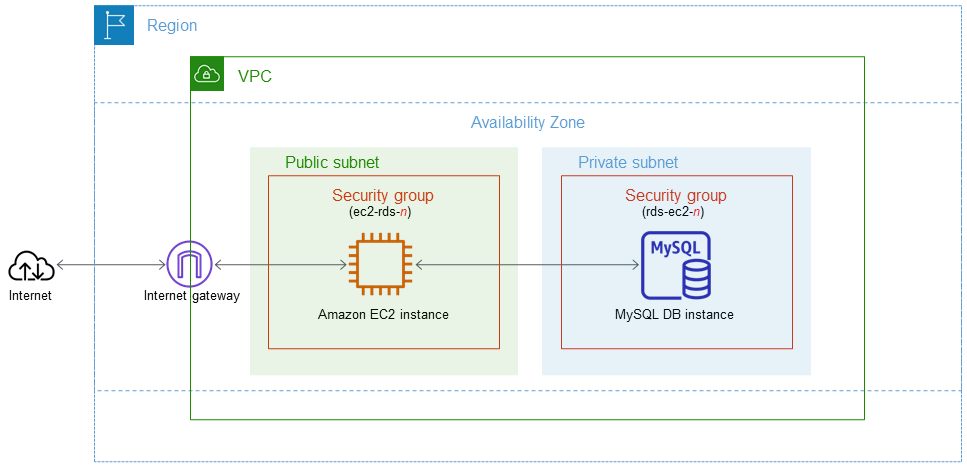
Supported Database Systems
Amazon RDS supports the following database systems:
- Amazon Aurora
- MySQL
- MariaDB
- Oracle
- SQL Server
- PostgreSQL
⚠️ Warning: RDS is a managed service and you do not have access to the underlying EC2 server (no root access). The exception is Amazon RDS Custom, which allows access to the underlying operating system, but is only available for a limited number of DB Engines.
Amazon RDS Management Features
Amazon RDS Management Services include:
- Security and patching for DB instances
- Automatic backups for DB instances
- Software updates for the DB engine
- Easy scaling for storage and computing
- Multi-AZ option with synchronous replication
- Automatic transfer for the Multi-AZ option
- Read Replicas option for heavy read workloads
ℹ️ Information: A DB instance is a cloud-based database environment with the computing and storage resources you specify. DB instances are accessed through endpoints that can be retrieved from the AWS Management Console, the DescribeDBInstances API, or the describe-db-instances command.
💡 Pro Tip: By default, customers are allowed a maximum of 40 Amazon RDS DB instances (only 10 of these can be Oracle or SQL Server unless you have a separate license).
Maintenance Window and Events
The maintenance window is configured to allow modifications to DB instances such as extensions and patch installations. You can define the maintenance window, or AWS will schedule a 30-minute window.
ℹ️ Information: Windows integration authentication only works with SQL Server when using domains created with AWS Directory Service - trust must be established with the AD directory in a traditional environment.
Events and Notifications
Amazon RDS uses AWS SNS to send RDS events via SNS notifications.
You can use the DescribeEvents API to list RDS events from the past 14 days.
You can view events from the past 14 days using the CLI command line.
In the AWS Console, you can only view RDS events from the past 1 day.
When to Use RDS and Alternative Services
| Data Storage Service | When to Use |
|————————|—————–|
| EC2 Databases | Maximum control over the database, preferred DBs not available on RDS |
| Amazon RDS | Need a traditional relational database for OLTP, well-structured data, existing application requires an RDBMS |
| Amazon DynamoDB | Name/value pair data, unpredictable structure, in-memory performance with persistence, high I/O demands |
| Amazon Redshift | Large volumes of data, primarily analytical load (OLAP) |
| Amazon Neptune | Relationships between objects are a critical part of data value |
| Amazon ElastiCache | Fast temporary storage for small amounts of data, highly volatile data |
| Amazon S3 | Large binary objects (BLOBs), static web pages |
💡 Pro Tip: If your use case isn’t supported on RDS, you can run the database on Amazon EC2 with full control and maximum flexibility, but you must manage everything yourself, such as backups, redundancies, updates, and scaling.
Encryption and Security
🔒 Security Note: You can encrypt Amazon RDS DB instances and snapshots at rest by enabling the encryption option. On-premise data encryption is supported for all DB types and uses AWS KMS.
When using on-premise encryption, the following are also encrypted:
- All DB snapshots
- Backups
- DB instance archives
- Read Replicas
⚠️ Warning: You cannot encrypt an existing DB; you need to create a snapshot, replicate it, encrypt the replica, and then build an encrypted DB from the snapshot.
RDS supports SSL encryption between applications and RDS DB instances, with RDS automatically generating certificates for instances.
DB Subnet Groups
ℹ️ Information: A DB Subnet Group is a set of subnets (usually private) that you create in a VPC and then assign to DB instances.
Each DB Subnet Group should have subnets in at least two Availability Zones.
It is recommended to configure a subnet group with subnets in each AZ (even for independent instances).
During RDS instance creation, you select the DB Subnet Group and AZ to place the RDS instance.
Billing and Provisioning
AWS charges for:
- DB instance hours (partial hours rounded up to full hours)
- GB/month storage
- Monthly I/O requests - for magnetic storage
- Provisioned IOPS/month - for RDS SSD IOPS